




How Next.js Improves Website Speed and Core Web Vitals
Website speed has become an essential part of building a successful online presence. Users expect pages to load quickly, interact smoothly, and remain visually stable while content loads. For businesses, poor website performance can lead to higher bounce rates, lower engagement, and a weaker overall user experience.
This is where Next.js can provide a significant advantage. As a React framework, Next.js includes several features designed to help developers build fast, scalable, and performance-focused websites.
But how exactly does Next.js improve website speed and Core Web Vitals?
Let’s explore the key features that make Next.js a strong choice for performance-focused websites.
What Are Core Web Vitals?
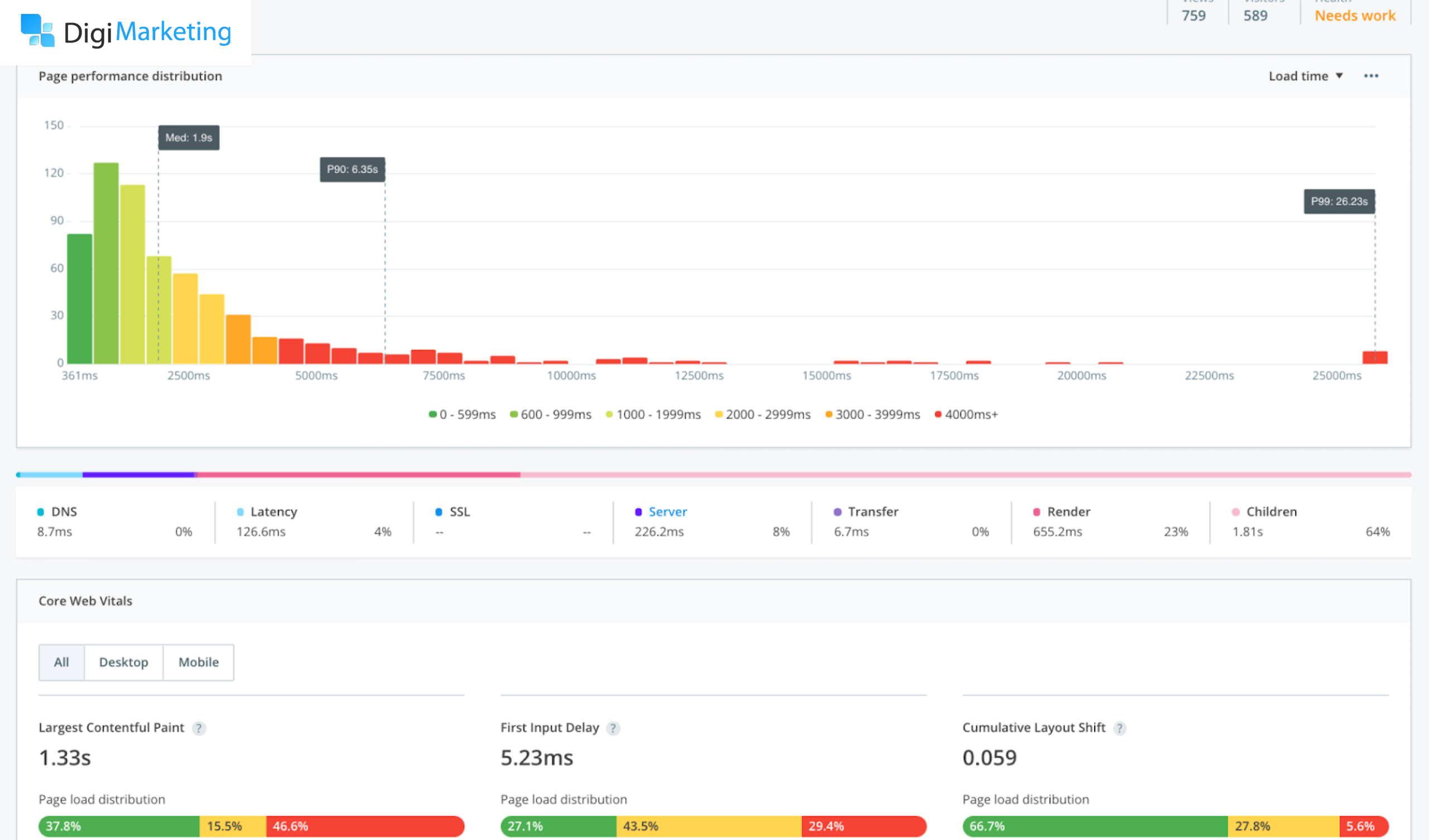
Core Web Vitals are Google’s metrics for evaluating important aspects of a webpage’s user experience.
The three primary Core Web Vitals are:
Largest Contentful Paint (LCP)
LCP measures how quickly the largest visible content element becomes available on the page.
A good LCP generally means that users can see the main content quickly.
Interaction to Next Paint (INP)
INP measures how responsive a page is to user interactions, such as clicking buttons, opening menus, or entering information into forms.
A lower INP indicates a more responsive experience.
Cumulative Layout Shift (CLS)
CLS measures unexpected movement of content while a page is loading.
For example, if a user tries to click a button but an image suddenly loads and moves the button, the page has experienced layout shift.
For businesses, optimizing these metrics can contribute to a better user experience and support a strong technical SEO foundation.

How Next.js Improves Website Performance
Next.js provides several features that can help developers optimize these performance metrics without having to build every optimization from scratch.
1. Server-Side Rendering
One of the biggest advantages of Next.js is its support for server-side rendering.
Instead of requiring the browser to build everything from JavaScript before displaying meaningful content, pages can be rendered on the server and delivered to users with content already available.
This can help improve the time it takes users to see important page content.
For content-heavy business websites, service pages, and landing pages, server-side rendering can be particularly useful.
2. Static Site Generation
Next.js also supports static generation.
With static generation, pages can be generated ahead of time instead of being generated from scratch for every request.
This can be highly effective for pages such as:
- About pages
- Service pages
- Blog articles
- Landing pages
- Documentation
- Marketing pages
Because these pages can be delivered efficiently, static generation can contribute to faster page loading.
3. Automatic Code Splitting
Large JavaScript bundles can slow down websites because browsers have to download, process, and execute unnecessary code.
Next.js automatically splits JavaScript so that pages can load the code they need rather than necessarily loading the entire application’s JavaScript upfront.
For example, if a website has a complex booking system on one page, users visiting the homepage don’t necessarily need to download all of the booking functionality.
This can reduce unnecessary JavaScript and improve loading performance.
4. Image Optimization
Images are one of the most common causes of slow websites.
Large images can consume significant bandwidth, particularly for mobile users.
Next.js provides an optimized image component that can help developers deliver appropriately sized images and use modern image formats where supported.
Image optimization can be particularly important for LCP, because the largest element on a page is often a hero image, banner, or other visual element.
Businesses should still optimize their original images and use appropriate dimensions and descriptive alt text.
5. Efficient Font Loading
Fonts can also affect page performance.
Loading multiple font files, weights, and styles can increase the amount of data browsers need to download.
Next.js provides font optimization features that can help developers load fonts more efficiently and reduce layout or rendering problems caused by external font requests.
This can contribute to a smoother visual experience.
6. React Server Components
Server Components allow certain components to be rendered on the server rather than sending all of their JavaScript to the browser.
This can reduce the amount of client-side JavaScript required for certain pages.
Less JavaScript can mean less work for the browser, which can be particularly useful on mobile devices or lower-powered hardware.
7. Caching and Content Reuse
Caching is another important part of website performance.
Instead of generating or retrieving the same content repeatedly, cached content can sometimes be reused for subsequent requests.
Next.js provides caching and rendering capabilities that allow developers to determine how different types of content should be generated, cached, and updated.
For businesses with frequently visited pages, effective caching can help reduce server processing and improve response times.
8. Prefetching and Faster Navigation
Next.js can also improve navigation between pages.
When using Next.js’s Link component, the framework can prefetch certain routes when appropriate.
This means that when a visitor clicks a link, some of the required resources may already be available.
As a result, navigation between pages can feel faster and more responsive.
For example, an SEO agency website might have links between:
SEO Services → Technical SEO → SEO Audit → Contact
Efficient navigation can make the overall website experience feel more seamless.
9. Reducing Client-Side JavaScript
Too much JavaScript can negatively affect responsiveness because browsers need to parse and execute it.
Next.js gives developers the ability to decide which components actually need to run in the browser.
Interactive components can be marked as client components, while non-interactive content can remain server-rendered.
Next.js’s routing and rendering capabilities can make managing this type of website easier.
E-commerce winner: Next.js
Interactive components can be marked as client components, while non-interactive content can remain server-rendered.
This separation can help businesses avoid sending unnecessary JavaScript to visitors.
Reducing unnecessary client-side JavaScript can be especially helpful for improving INP.
10. Preventing Layout Shifts
CLS can occur when content changes position unexpectedly while a page is loading.
Common causes include:
- Images without defined dimensions
- Dynamically injected advertisements
- Late-loading fonts
- Embedded content
- Pop-ups
- Elements that change size after loading
Next.js’s image optimization features can help developers reserve appropriate space for images, reducing one common cause of layout shifts.
Developers still need to carefully design the rest of the page to maintain visual stability.
Next.js and Mobile Performance
Mobile performance is particularly important because mobile devices may have slower processors and less reliable network connections than desktop computers.
A website that loads quickly on a high-end desktop may still feel slow on a budget smartphone.
Next.js provides tools that can help developers optimize:
- JavaScript delivery
- Images
- Fonts
- Page rendering
- Caching
- Server-side processing
However, the final performance depends on implementation, hosting, third-party scripts, and the overall website architecture.
Does Next.js Automatically Improve Core Web Vitals?
No.
This is an important distinction.
Using Next.js does not automatically guarantee excellent Core Web Vitals.
A poorly optimized Next.js website can still have:
- Slow LCP
- High INP
- Poor CLS
- Large JavaScript bundles
- Slow server response times
- Unoptimized images
- Excessive third-party scripts
Next.js provides tools and architecture that can make optimization easier, but developers still need to use those tools correctly.
Best Practices for Improving Core Web Vitals With Next.js
Businesses and developers should combine Next.js’s built-in features with practical optimization techniques.
To improve LCP:
- Optimize the largest above-the-fold image.
- Use appropriate image sizes.
- Reduce server response time.
- Avoid unnecessary render-blocking resources.
- Use efficient caching.
- Prioritize important content.
To improve INP:
- Reduce unnecessary JavaScript.
- Avoid long-running browser tasks.
- Minimize heavy third-party scripts.
- Keep interactive components lightweight.
- Use server components where client-side JavaScript isn't necessary.
To improve CLS:
- Define image dimensions.
- Reserve space for advertisements and embeds.
- Avoid injecting content above existing content.
- Optimize font loading.
- Keep page layouts stable during loading.
How Website Speed Supports SEO
Website performance is only one part of SEO, but it can have an important impact on user experience.
A fast website can make it easier for visitors to:
- Browse multiple pages
- Read content
- Purchase products
- Contact a business
- Interact with navigation
- Return to the website
Website performance is only one part of SEO, but it can have an important impact on user experience.
A fast website can make it easier for visitors to:
For businesses that rely on organic traffic, improving technical performance should therefore be part of a broader SEO strategy that also includes high-quality content, search intent optimization, internal linking, structured data, and technical SEO.
Next.js vs Traditional React for Performance
React can be used to build extremely fast websites. However, developers may need to configure additional tools and architecture to achieve specific rendering and performance goals.
Next.js provides many performance-oriented capabilities as part of its framework.
This makes it particularly attractive for businesses that want a React-based website without having to assemble every part of the application architecture themselves.
Final Thoughts
Next.js provides a powerful foundation for building fast and modern websites. Server-side rendering, static generation, image optimization, code splitting, server components, caching, and optimized navigation can all contribute to better website performance.
However, Next.js is not a magic solution for Core Web Vitals.
The best results come from combining Next.js’s capabilities with careful development, optimized images, efficient JavaScript, fast hosting, stable layouts, and ongoing performance monitoring.
For businesses that prioritize SEO, speed, user experience, and scalability, Next.js can be an excellent framework for building a high-performance website that is prepared for modern search and user expectations.
 Schedule a Call Today